
A potential customer finds the right service, clicks “Request a Quote,” and lands on “Page Not Found.” Your attractive website may look active, but a dead end can make it feel like a digital ghost town.
How many customer journeys end at a broken link? When a route no longer reaches its intended destination, visitors can lose trust and leave before they enquire. Dead ends can also affect SEO and make it harder for search engines to understand your pages.
This guide offers a practical way to find broken links, assess their impact, choose a repair, and check that it works. A link checker, a site crawl, and Google Search Console can help you spot issues. A report is a useful starting point, not a complete repair plan.
The University of Wyoming CMS generates broken-link reports weekly, giving editors a regular chance to review their site. IBP helps businesses build dependable websites and smoother paths from a visitor’s first click to an enquiry.
Key Takeaways
- A dead-end route can interrupt a customer journey.
- Missing pages may hurt visitor experience and SEO.
- Use tools and regular reports to spot issues.
- Review each issue, make the right repair, and test it.
- Dependable navigation helps visitors reach the next step.
Why Broken Links Can Turn Your Website Into a Digital Ghost Town
A visitor may start at a menu, choose a service, then reach a missing page with a 404 error. Instead of finding useful details, they must guess where to go next. That extra effort can end a customer journey.
How Missing Pages and Dead-End Navigation Disrupt Customer Journeys
People often move from a search result to a service page, then to contact information. If a page has moved and the route still points to it, visitors may leave before they learn what your business offers. Clear paths help them keep moving.
How Broken Links Can Cost Enquiries and Weaken User Experience
A failed contact link can stop an interested customer just before an enquiry. University of Wyoming CMS guidance notes that these issues can harm visitor experience and site performance. They may also affect SEO: when people leave after an error, search engines may see less value in the page.
“Every useful next step should be easy to find.”
- Check routes to key service pages and contact details.
- Restore access to needed content when fixing a broken link.
Regular review supports a smoother user experience. It also helps visitors reach the information they need without losing trust in your website.
Common Causes of Broken Links on a Website
Small website changes can quietly turn useful routes into dead ends. A common cause is deleted content: if editors remove a page without updating links pointing to it, visitors may see a 404 error.
Changed URLs create another problem. A page may still exist, but an old address sends people elsewhere. Typos are different: one misplaced character in a URL can send a hyperlink to the wrong destination.
External resources can also disappear when another site removes or moves them. The University of Wyoming notes that WyoCast recordings leave its server 18 months after recording, so time-limited resources need review. For internal pages and files, Modern Campus CMS uses dependency-tag IDs that stay intact when an item moves or gets renamed. That can help prevent internal link issues.
A regular report can help teams identify broken links before they disrupt search or SEO. Use the list to check each destination and its content.
| Cause | What happens | Review step |
|---|---|---|
| Deleted content | The page no longer exists | Update references or restore needed content |
| Changed URL | An old address points elsewhere | Check the current page address |
| Typo | A hyperlink contains an incorrect character | Compare the URL with the intended destination |
| Outdated external resource | Another site moves or removes a resource | Review time-sensitive references regularly |
How to Fix broken links with a Crawler, Google Search Console, and Manual Checks
A useful audit combines automated checks with real user tests. Start broad, then inspect the routes that support sales and service.
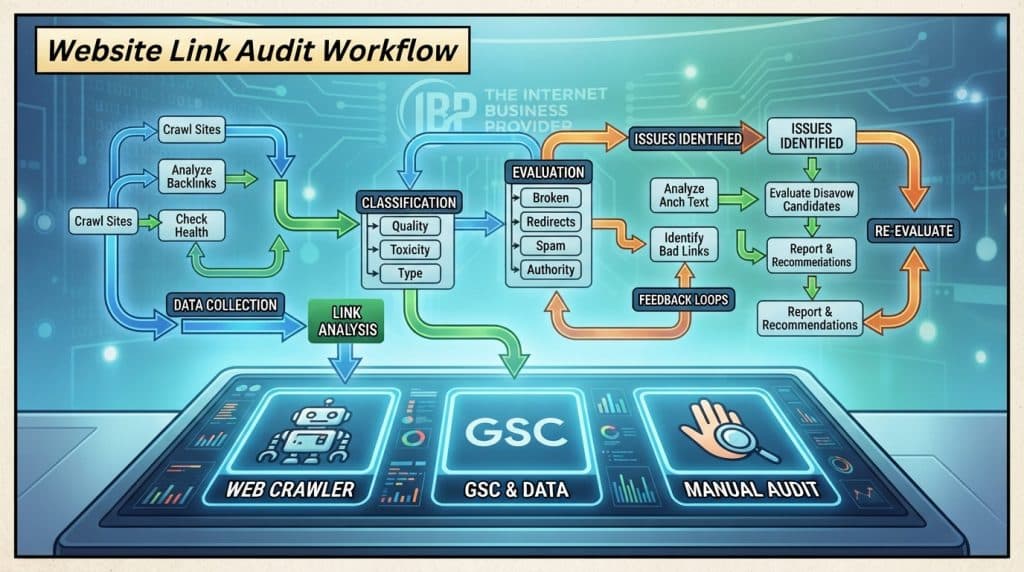
Use a Website Crawler to Find Internal and External Issues
Run a crawler or link checker across internal and external destinations. Review each affected page, URL, and status code. These details help you identify the right repair instead of guessing at the cause.
Check Google Search Console for Not Found Errors
In Google Search Console, open “Indexing” and select “Pages.” Review the “Not found (404)” report for errors Googlebot has seen. It is a useful source, but it cannot show every issue because it only records errors encountered by Googlebot.
Manually Test Menus, Contact Links, and Enquiry Buttons
Click through menus, contact details, and enquiry buttons on key pages. Automated tools may not reveal whether these paths work as intended for customers.
When your CMS allows it, correct the destination, republish the page, then test it again or wait for the next crawl. Siteimprove recommends this process. The University of Wyoming’s weekly report offers a model for routine checks; its CMS team is available at webhelp@uwyo.edu, 1000 E. University Ave., Laramie, WY 82071.
Prioritize Broken Links on Important Customer Journeys
Some dead ends carry more risk than others. A high-intent route to a quote or contact form deserves attention before a low-traffic reference. It can affect customer experience and SEO, even when the rest of the website works.

Example: Find and Fix a Broken “Request a Quote” Link
Start on a service page, then click the “Request a Quote” button. Follow each step to the form and note any error. A failed button can stop a prospect from sending an enquiry, while other pages and content remain available.
Use your tools to record the affected page, URL, status code, customer impact, and repair owner. This makes it easier to rank issues by value to customers and search. After you update the destination, test the full path—not just whether the link page loads.
Confirm that a visitor can reach and submit the form. That end-to-end check helps you fix broken routes where they matter most and protect the enquiry journey.
Choose the Right Fix: Update a Link, Restore a Page, or Add a 301 Redirect
Choose a response based on what visitors need, not just the status code. The right choice keeps useful content available and gives search engines a clear signal. When fixing broken links, review the destination before changing a route.
Update Links When You Know the Correct Destination
If content moved to a new URL, edit the internal link to point straight to its current page. This direct route saves visitors an extra step and helps remove broken paths across your site.
Restore a Page When Its Content Is Still Needed
Bring back a missing page when customers still need its information and no suitable replacement serves the same purpose. Check related pages and file references so the restored content works as intended.
Use a Relevant 301 Redirect—or Return a 404 or 410 When Content Is Gone
Use a permanent 301 redirect when a page has moved or a relevant replacement exists. It forwards visitors and search engines to the new URL and preserves most of the original page’s link equity. This can support SEO when the new destination matches the old content.
Do not send every missing page to the homepage. If the content no longer exists and has no relevant replacement, return a 404 for not found or a 410 for permanent removal. Match the response to the visitor’s intent.
Prevent Repeat Issues with a Helpful 404 Page and Regular Maintenance
Even a careful update can leave a route that no longer works. A helpful 404 page and a steady review routine can keep broken links from turning into lasting issues.
Guide Visitors Back with Navigation and Search on a Custom 404 Page
Use plain language to explain the error. Add a search box, clear navigation, and paths to key pages. Give visitors a useful next step instead of a dead end.
“A clear next step can turn a setback into a smoother visit.”
Use a Recurring Checklist to Catch Issues Early
Check links before publishing and during routine maintenance. The University of Wyoming CMS Page Check reviews staging and live pages. Its editors also check weekly reports. Modern Campus CMS dependency-tag IDs stay with pages or files when moved or renamed.
- Scan internal and external destinations; test menus and enquiry routes.
- Review error reports and confirm recent repairs still work.
- Check time-sensitive resources; WyoCast recordings leave after 18 months.
A weekly review helps teams find broken links and supports user experience and SEO. Use this short list to keep each crawl focused.
| Review item | When | Purpose |
|---|---|---|
| Page Check and link scan | Before publication | Catch issues before pages go live |
| Site report and enquiry paths | Weekly | Keep important routes usable |
| Time-limited resources | On a regular schedule | Replace or remove expired content |
Conclusion
A dependable website makes each next step clear, from finding useful content to sending an enquiry. Broken links, a missing page, or a dead-end link can frustrate visitors and keep prospective customers from reaching your team.
Build a simple routine: crawl the site, review Google Search Console, and manually test key customer journeys. Check internal links, then choose a response that fits each page and its purpose. Use a 301 redirect only when a suitable replacement exists. Let content with no replacement return a 404 or 410 error.
Regular checks and a helpful 404 page give visitors a way back to useful pages. This care supports SEO and helps a search engine understand your site. Keep SEO in mind as your content changes.
Want a more dependable path from search to enquiry? Talk with IBP about practical website maintenance at www.theinternetbusinessprovider.com.