
Imagine spending thousands of dollars on a beautiful storefront only to leave the front door locked. For millions of shoppers, this is their daily reality in the digital world. An invisible wall often blocks eager buyers from spending money at your business.
In the United States, over 61 million adults live with various disabilities. They often face digital barriers like broken keyboard navigation or poor color contrast. When a website fails to meet basic standards, it really hangs a “closed” sign for these shoppers.
Keeping an ADA Compliance Website is more than just a simple legal task. It represents a massive chance to reach more people and grow your total revenue. Without digital accessibility, you are likely handing your customers over to your rivals every single day.
The Internet Business Provider (IBP) specializes in helping businesses systematically break down these digital barriers for good. We help you find and fix hurdles so all people can enjoy your services. Improving your accessibility protects your brand and ensures that shoppers with disabilities can buy with ease.
Key Takeaways
- Over 61 million American adults encounter significant barriers when browsing online.
- Common technical errors like poor contrast act as a locked door to your shop.
- Inaccessible platforms lose major revenue to more inclusive and friendly competitors.
- The Internet Business Provider (IBP) helps businesses remove hurdles to capture market share.
- Digital inclusion protects your organization against a rising tide of legal actions.
- Proper accessibility creates a welcoming environment that builds long-term brand loyalty.
The Invisible Barrier Blocking Millions of Potential Customers
A website that lacks essential features acts like a locked door for millions of potential customers. This invisible barrier prevents people disabilities from interacting with your brand or buying your products. According to the World Health Organization, over 16% of the global population lives with some form of disability.
Poor web accessibility creates digital hurdles that are just as real as physical stairs at a storefront. If a person cannot move through your digital pages, they cannot access vital information about your services. Today, everyone relies on the internet for health resources, voting, and transit schedules.
Ignoring accessibility leads to abandoned shopping carts and lower total sales. Many users browse the web using screen readers or keyboard-only navigation rather than a mouse. Failing to meet ada standards drives these loyal customers straight to your competitors.
Every frustrated exit from your site represents a lost relationship and a hit to your brand reputation. Businesses must realize that digital inclusion is no longer optional in a connected world. Ensuring your website works for people disabilities is the only way to capture the full market.
| Barrier Type | Physical World Example | Digital World Equivalent |
|---|---|---|
| Navigation Issues | High steps at a building entrance | No keyboard or screen reader support |
| Visual Obstacles | Small print on paper menus | Low color contrast and missing alt text |
| Communication Gaps | No sign language interpreters | Videos without captions or transcripts |
What is an ADA Compliance Website?
Creating a digital space that welcomes all visitors is the main goal of website accessibility. This type of site ensures that every visitor can perceive and navigate your content easily. It removes digital walls that often block people with physical or cognitive challenges.
Understanding the Americans with Disabilities Act for Digital Spaces
The americans disabilities act became law in 1990 to provide equal opportunity for everyone. While the disabilities act was written before the modern internet, its reach has expanded. Today, the Department of Justice views web services as public places that must be open to all.
This means businesses must follow technical rules to prevent discrimination online. True accessibility involves creating fair experiences for all users, rather than identical ones. Providing equivalent access is the key to legal and moral success.
Who the ADA Protects: Qualified Individuals with Disabilities
The ada protects individuals disabilities whether their specific conditions are temporary or permanent. This group includes people with impairments that limit major life activities. The americans disabilities act also protects those with a history of illness, like cancer in remission.
Many different disabilities are covered under these federal protections. For instance, individuals disabilities might have visual, auditory, or motor impairments. Providing access ensures that more people can participate fully through ada standards and avoid the barriers created by different disabilities.
| Protection Group | Impairment Type | Specific Examples |
|---|---|---|
| Sensory | Visual and Auditory | Blindness, Deafness, Low Vision |
| Cognitive | Mental and Intellectual | Autism, Traumatic Brain Injury |
| Physical | Motor and Mobility | Cerebral Palsy, Epilepsy, Scars |
- Visual: Screen reader support for those with blindness or low vision.
- Auditory: Captions and transcripts for users with hearing loss.
- Motor: Keyboard-only navigation for individuals with limited mobility.
- Cognitive: Clear layouts for people with intellectual disabilities.
The Legal Framework: ADA Title II and Title III Requirements
The legal framework governing web accessibility anchors itself in two key sections of the ADA that target both public and private sectors. These sections create clear rules for how organizations must interact with the public online.
Understanding these distinctions helps organizations avoid costly lawsuits and ensure equal access for all users. Each title carries specific weight and defines different sets of responsibilities under federal law.
State and Local Government Obligations Under Title II
Title II of the ADA prohibits discrimination by state local governments in all their programs and services. This mandate ensures that every state agency provides communications as effective as those offered to people without disabilities.
In the digital age, state local governments must provide equal access to essential online tools. These tools include voter registration, permit applications, and emergency notifications.
When a government website remains inaccessible, it creates a wall that blocks citizens from their own civic duties. Public entities must treat digital accessibility with the same urgency as physical ramps in a city hall.
Public Accommodations and Private Businesses Under Title III
Title III of the ADA targets private businesses, often called public accommodations. This title covers retail stores, banks, hotels, and restaurants that serve the general public.
The law requires these businesses to provide full and equal enjoyment of their goods and services. While Title III does not yet have the same specific 2024 deadlines as the public sector, courts consistently apply it to websites.
Many private governments and business leaders face enforcement actions when their apps create barriers. Every commercial establishment must ensure that their digital storefront is open to everyone, regardless of their physical or sensory abilities.
The 2024 DOJ Final Rule and Compliance Deadlines
In April 2024, the department justice signed a landmark final rule to clarify web accessibility. This rule removes any confusion about how local governments must manage their websites and mobile applications.
The department justice set strict timelines for meeting WCAG 2.1 Level AA standards. Larger local governments with 50,000 or more residents must achieve full compliance by April 26, 2027.
Smaller local governments and special districts have until April 26, 2028, to meet these requirements. This government action signals a new era where digital inclusion is a mandatory standard rather than a suggestion.
Proactive governments are already auditing their systems to meet these approaching dates. Staying ahead of these governments regulations protects agencies from legal risks and serves the community better.
| Entity Type | Applicable Title | Main Requirement | Compliance Deadline |
|---|---|---|---|
| State agencies | Title II | Effective Communication | April 2027 |
| Large Cities (50k+) | Title II | WCAG 2.1 Level AA | April 26, 2027 |
| Small Towns ( | Title II | WCAG 2.1 Level AA | April 26, 2028 |
| Retail & Banks | Title III | Full & Equal Enjoyment | Ongoing/Immediate |
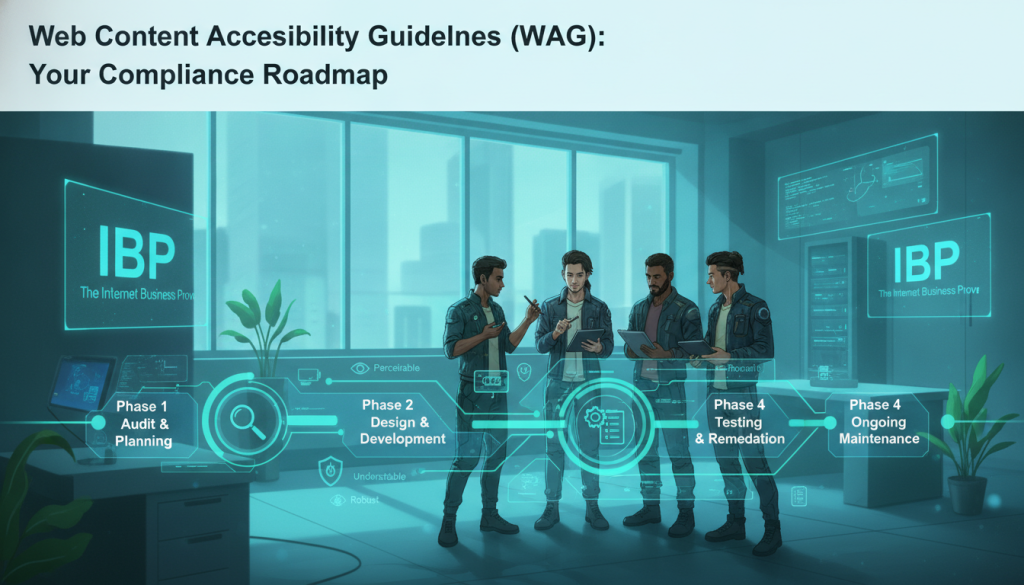
Web Content Accessibility Guidelines (WCAG): Your Compliance Roadmap
The World Wide Web Consortium developed these content accessibility guidelines to define global standards. They provide a technical foundation for making digital spaces usable for everyone. These guidelines ensure that digital interaction remains fair and open for every visitor.
The wcag 2.2 standards organize around four main pillars for success. These include making web content perceivable, operable, understandable, and robust. This framework serves as a vital roadmap for achieving true web content accessibility in a competitive market.
Level A: Minimum Accessibility Standards
Level A sets the most basic accessibility guidelines for a digital platform. While it provides a starting point, meeting only these criteria rarely removes all major barriers. Most organizations view this as a foundational step rather than a complete solution for their users.
Level AA: The Required Industry Standard
Most legal experts view Level AA as the essential benchmark for web content accessibility. The Department of Justice now points to wcag 2.2 Level AA as the primary roadmap for government compliance. Following these content accessibility guidelines helps businesses avoid legal risks and reach a much wider audience.
Level AAA: Advanced Accessibility Best Practices
This tier reflects the most advanced best practices for digital accessibility. While wcag 2.2 Level AAA is the gold standard, it ensures total accessibility for almost all users. Striving for this level ensures your web content stays ahead of evolving accessibility guidelines and rising user expectations.
| Compliance Level | Primary Focus | Legal Significance |
|---|---|---|
| Level A | Basic web barriers | Foundational baseline |
| Level AA | Common user obstacles | Required industry standard |
| Level AAA | Specialized needs | Aspirational gold standard |
Common Accessibility Barriers That Drive Customers Away
Business owners often overlook small design choices that create massive roadblocks for people with disabilities. These common errors make accessibility a challenge, frustrating potential clients and leading to significant revenue loss. When a site fails to meet basic standards, it sends a clear signal that certain guests are not welcome.
Poor Color Contrast and Visual Design Issues
People with limited vision or color blindness cannot read text if there is not enough color contrast. For example, light gray text on a light-colored background might look modern, but it is functionally invisible to many users.
Standard guidelines require a minimum color contrast ratio of 4.5:1 for normal text. Many websites fail to meet this requirement, rendering their content unreadable for millions of people with visual impairments.
Missing Alternative Text on Images and Graphics
Blind users rely on screen readers to interpret visual content. If an image or chart lacks alt text, the software cannot explain the purpose of that graphic to the person browsing.
Every product photograph and informational diagram needs descriptive alt text to be useful. Without these labels, significant portions of your site become meaningless to those using assistive technology.
Keyboard Navigation and Focus Problems
Many individuals cannot use a mouse or trackpad due to mobility disabilities. Instead, they navigate websites using only keyboard commands. If a site traps the keyboard focus or lacks visible indicators, these visitors will likely abandon the page within seconds.
Inaccessible Forms, Tables, and PDFs
Online forms often drive customers away when they lack clear labels or error instructions. For example, a user might not know which field is wrong if the error message is only a color change. Additionally, many PDF documents are simply images that accessibility tools cannot scan or read.
| Accessibility Barrier | Affected Audience | Business Consequence |
|---|---|---|
| Low color contrast | Visually Impaired | Increased Bounce Rates |
| Missing alt text | Blind Users | Lost Sales Opportunities |
| No Video Captions | Deaf/Hard of Hearing | Poor Brand Reputation |
Video and Multimedia Content Without Captions
Multimedia elements without captions exclude the deaf and hard-of-hearing community from your message. Providing alt text for graphics and captions for audio ensures everyone can engage with your promotional materials.
Missing captions also harm your search engine rankings. Search engines cannot index spoken words, so adding text alternatives helps improve your overall visibility while serving all customers equally.
How to Achieve ADA Compliance: A Step-by-Step Implementation Guide
Effective ADA compliance turns a legal goal into daily business practices. Use these five steps to build a clear plan, assign ownership, and measure progress.
Step 1: Publish an External Accessibility Statement
Tell customers what your organization has improved and what it plans to address. A clear statement shows transparency and gives people a direct way to report barriers.
What to Include in Your Statement
Describe your commitment, current WCAG target, known limitations, feedback contact, and expected remediation timeline. Update the page when your website changes.
Where to Display Your Commitment
Place a visible link in the website footer. Keep it easy to find from every page, and offer an accessible contact method, such as email or phone support.
Step 2: Assign Accessibility Responsibilities and Build Your Team
Accessibility requires teamwork. Leadership sets priorities and funding. Developers and designers build usable products. Content contributors create accessible pages, while customer service triages concerns. Procurement teams should select vendors that support these practices.
Leadership and Executive Buy-In
Executives can approve budgets, policies, training, and deadlines. Their support helps make ADA compliance part of business strategy.
Developer and Designer Roles
Technical teams should use semantic code, keyboard testing, readable layouts, and accessible components during development—not only after launch.
Content Contributors and Customer Service
Writers should add meaningful image descriptions and captions. Support staff should record complaints, offer help, and send issues to the right owner.
Step 3: Adopt an Internal Accessibility Policy
Setting Goals and Benchmarks
Set measurable goals, such as WCAG 2.1 Level AA conformance, staff training, and repair deadlines.
Creating Accountability and Reporting
Define who reports issues, how often teams review results, and which leaders track progress. Regular reporting keeps accessibility active.
Step 4: Include Accessibility Requirements in Vendor Contracts
Contract Language and Standards
Require vendors to follow stated standards, provide test reports, and show proof of ongoing improvement.
Remediation Requirements and Penalties
Set repair deadlines and consequences for missed commitments. These terms reduce legal risk and protect your brand.
Step 5: Conduct Your Initial Accessibility Audit
Begin with automated scans, then add expert manual testing with assistive technology. Professional ADA website accessibility audit services can reveal issues tools miss and establish a useful baseline. Test, fix, and repeat to make ADA compliance a lasting practice for all individuals.
Essential Technical Requirements for ADA Compliance Website Success
Creating an inclusive digital space involves mastering specific backend elements that translate visual designs into meaningful data for assistive tools. To make sure your web content is accessible, you must focus on semantic structure and operability. This technical foundation allows every visitor to interact with your brand effectively.
Proper Heading Structure and Semantic HTML
Headings organize web items in a logical order from H1 down to H4. This hierarchy helps screen readers navigate the content efficiently by jumping to relevant sections. Without this structure, many users will struggle to find the specific information they need.
Text Formatting and Font Accessibility
Never rely on color alone to convey meaning or distinguish content on a page. Use strong text, italics, or bulleted lists to guide the user through important points. This approach ensures that those with color blindness can still understand your message clearly.
Color Contrast Requirements: Meeting the 4.5:1 Ratio
Every piece of text needs a contrast ratio of at least 4.5:1 against its background. High-contrast schemes make sure that individuals with low vision can read your websites without strain. Testing these combinations is a vital part of maintaining a compliant design.
Alternative Text Best Practices for All Visual Content
All visuals, including logos, banners, and icons, need descriptive alt text. If an image conveys a specific message, it must have a text equivalent for web accessibility. Decorative items should be marked so screen readers skip them to avoid confusion.
Keyboard Accessibility and Skip Navigation
Your websites must be fully navigable using only a keyboard. Include a “Skip Navigation” link at the top to allow people to jump straight to the main content. This feature saves time for those who cannot use a traditional mouse.
Accessible Forms with Clear Labels and Error Messages
Forms require visible labels and clear instructions for every input field. If a user makes a mistake, the system should identify the specific error and offer a fix. This helps users complete transactions or signups without unnecessary frustration.
Table Structure and Data Presentation
Use proper HTML tags like table headers to define relationships between data cells. This markup allows screen readers to announce information in a way that makes sense. A clear structure is vital for presenting complex data tables to everyone.
Organizations must verify that all these requirements work together as a single cohesive unit. Accessible web content depends on the cumulative effect of proper markup and thoughtful design. Focus on these technical details to build a digital presence that serves every customer.
Testing and Maintaining Your ADA Compliance Website

A strong accessibility plan combines automated scans with human review. This approach helps protect users, reduce risk, and support lasting ADA compliance as digital content changes.
Automated Testing Tools: Benefits and Limitations
Automated web accessibility testing tools can scan large websites quickly. They find common issues such as missing labels, weak color contrast, broken heading order, and missing alternative text. They also create useful reports for developers and support regular monitoring.
However, these tools usually detect only about 30–40% of accessibility barriers. They may miss poor reading order, unclear image descriptions, keyboard traps, and problems that require context. Use automation as an efficient first check, not as the entire solution.
Manual Testing and Expert Accessibility Audits
Expert reviewers test with keyboards, screen readers, zoom settings, and other assistive technology. Their judgment confirms whether a website works in real situations, not only whether its code passes a scan.
Ongoing Monitoring and Continuous Improvement
Website accessibility health can change after a redesign, new feature, vendor update, PDF upload, or video campaign. Continuous testing helps teams find new barriers before they affect customers. ADA compliance is an ongoing program, not a one-time task.
When to Schedule Accessibility Audits
Schedule an audit when concerns arise, risk levels change, contractors join, or a migration or redesign begins. Regular reviews help keep websites usable and support continuous improvement.
The Hidden Revenue Impact: What Non-Compliance Really Costs
Many business owners view digital accessibility as a mere legal hurdle, yet the true cost of staying stagnant often reveals itself in the bottom line. The World Health Organization reports that over 16% of the global population has a disability. This means a massive portion of your audience might struggle to access vital information about your products if your site is not optimized.
Ignoring these users is not just a moral oversight; it is a significant financial mistake. Organizations that actively pursue accessibility excellence are better positioned to address claims and avoid costly violations. By removing barriers, you open your doors to a loyal and underserved market.
Lost Market Share: Missing 61 Million American Customers
Businesses effectively exclude 61 million American customers when they ignore digital barriers. This group represents over $490 billion in disposable income that flows to competitors with accessible digital experiences. This ongoing revenue hemorrhage compounds year after year as excluded customers establish relationships with brands they can actually use.
Lost market share extends beyond the United States, as hundreds of millions of people globally face similar challenges. When your website is inaccessible, you are essentially turning away nearly one-fifth of your potential traffic. Providing equal access for people disabilities is the only way to capture this massive, untapped economic power.
Rising ADA Lawsuit Trends and Legal Expenses
The law requires digital spaces to be accessible to everyone, and litigation is on the rise. Data from law firm Seyfarth Shaw shows that thousands of lawsuits are filed every year against businesses with inaccessible websites. Recent years show that AI adoption has acted as an accelerant, driving even more ada legal actions against companies of all sizes.
Legal expenses from a single lawsuit typically include attorney fees and settlement costs that often range from $10,000 to $100,000. Beyond these fees, businesses must pay for mandatory website remediation and ongoing monitoring under court orders. These preventable expenses far exceed the cost of proactive accessibility implementation.
Brand Reputation Damage and Customer Trust Erosion
Public lawsuits alleging discrimination against people disabilities can destroy a brand’s reputation in weeks. Negative media coverage and social media backlash create a lasting perception that your organization does not value inclusivity. This damage is often permanent and can alienate even those customers who do not have disabilities.
Customer trust erosion happens quickly when people disabilities encounter frustrating barriers and share their experiences with their networks. This ripple effect damages your standing with a broad customer base that prioritizes corporate social responsibility. Providing clear information and an inclusive experience protects your brand from these preventable social losses.
| Risk Factor | Non-Compliance Cost | Proactive Compliance Benefit |
|---|---|---|
| Legal Financials | High settlements & fees | Predictable maintenance costs |
| Market Access | Loss of 61M US customers | Access to $490B income |
| Brand Equity | Public trust erosion | Industry leader reputation |
Ultimately, the cumulative cost of non-compliance typically exceeds the investment required for ada compliance by a factor of ten or more. Organizations that value people disabilities fundamentally improve the user experience for every visitor. Framing accessibility as a revenue opportunity rather than a burden is the key to long-term digital success.
Inclusive design helps your business reach more people while shielding you from the rising tide of litigation. When you prioritize those with disabilities, you demonstrate that your brand is truly built for everyone. Don’t wait for a legal notice to make the necessary changes to your digital presence.
Beyond Compliance: Business Benefits of an Accessible Website
Prioritizing accessibility is not just a legal shield; it is a powerful growth engine for your site. Modern web accessibility creates real value that goes straight to your bottom line by expanding your reach.
High-performing companies treat inclusion as an opportunity rather than a chore. This mindset shift leads to more organic traffic and builds deep customer loyalty over time.
Enhanced SEO Performance and Search Rankings
Search engines reward clarity and logical structure in every digital space. By following accessibility best practices, you help search bots crawl and index your content more effectively.

Using transcripts for audio and video files makes your media discoverable to search algorithms. These technical improvements help your site climb the rankings and attract more visitors organically.
Superior User Experience for All Visitors
A clean web design helps every single person who visits your page. The World Health Organization notes that over 16% of the global population lives with some form of disability.
Improvements like high color contrast and clear fonts ensure that every user finds the information they need. When a user has a smooth experience, they are much more likely to return to your brand.
“Web accessibility is not just a feature; it is the foundation of a truly inclusive digital economy.”
Higher Conversion Rates and Customer Satisfaction
When you remove digital barriers, your total revenue often grows significantly. People prefer to stay on a site where they can easily navigate and complete forms without errors.
High website accessibility ensures that finding information is a seamless experience for everyone. Streamlined checkouts and clear labels lead to fewer abandoned carts and higher sales totals.
Competitive Market Advantage
Standing out in a crowded market requires a dedicated focus on inclusion. Most companies ignore website accessibility, leaving a massive market gap for your business to fill successfully.
Leading with web inclusivity builds a strong brand reputation in the United States. You gain a competitive edge by welcoming the millions of customers that your competitors currently exclude.
- Expanded Audience: Reach the 61 million Americans living with disabilities.
- Reduced Risk: Avoid costly legal fees and brand damage from lawsuits.
- Technical Excellence: Faster load times and better mobile performance.
| Business Benefit | Primary Impact | Target Audience |
|---|---|---|
| SEO Rankings | Higher Organic Traffic | All Web Users |
| UX Design | Lower Bounce Rates | Mobile & Disabled Users |
| Brand Loyalty | Market Differentiation | Inclusive Communities |
ADALeadz: Your Partner in Breaking Down Digital Barriers

ADALeadz helps organizations turn digital inclusion into a practical business strategy. Through IBP (The Internet Business Provider), it addresses barriers at the source code level instead of masking them with surface fixes. This approach supports genuine ADA compliance and helps businesses reach more customers.
Comprehensive ADA Compliance Solutions from IBP
IBP begins with detailed audits across your digital properties. Its team builds a prioritized remediation roadmap, supports implementation, and provides ongoing reviews as your website changes. Each step creates a clearer path toward lasting accessibility.
Expert Remediation and Technical Support
ADALeadz specialists apply WCAG guidance with both code and user experience in mind. They help ensure that pages work with screen readers, keyboard controls, and other assistive technology. Training and governance support also help your team maintain progress.
Automated Monitoring and Legal Risk Protection
Automated scans can alert teams when new content introduces barriers. Reports document corrective action and support a good-faith compliance program. Monitoring cannot replace expert review, but it helps protect the website as it grows.
Why Overlays and Widgets Fall Short
A plug-in, widget, or overlay changes how a page appears without repairing its underlying code. Courts have questioned this shortcut. In one recent lawsuit, an eyewear retailer had to fund an external audit and add staff after its overlay failed to provide genuine accessibility. ADALeadz delivers a sustainable solution that strengthens ADA compliance, user trust, and market reach.
Conclusion
Prioritizing digital inclusion transforms your online presence from a restricted zone into an open gateway for all visitors. This change removes the barriers that often block millions of potential customers from reaching your products. Investing in genuine accessibility is a smart move that welcomes all people regardless of their physical abilities.
True compliance demands more than just a quick software fix or a simple widget. You must implement technical standards and monitor your website to ensure long-term success. Partnering with experts like ADALeadz ensures your digital assets meet ada requirements and protect your brand from legal risks.
The business case for an accessible website remains clear and powerful for any modern organization. You gain access to 61 million Americans while boosting your search engine rankings and user experience. This strategy turns technical obligations into a strategic advantage that builds deep loyalty with your audience.
The time to act is now, before your competitors capture the market share you are missing. By following these steps, you can remove obstacles and serve all people in our connected world. Let IBP help you build a brand that truly values equal opportunity for everyone.