
You have invested significant time and money into your digital marketing and search engine optimization. Yet, visitors arrive and leave almost immediately. This frustrating phenomenon is often called the “Ghost Town” effect.
When users click a button only to hit a dead end, their trust in your brand evaporates. These errors act as invisible roadblocks that frustrate your audience and signal to search engines that your site is neglected. Proactive maintenance is the secret to keeping your online storefront professional and functional.
Fixing Broken Links on Website infrastructure is essential for long-term success in today’s competitive digital landscape. By cleaning up these digital errors, you ensure that both human visitors and search engine bots can navigate your content with ease. A healthy site is a living, breathing asset that rewards your business with better engagement and higher rankings.
Key Takeaways
- Dead ends drive visitors away and hurt your brand reputation.
- Search engine bots struggle to crawl sites with many errors.
- Regular maintenance improves your overall search engine rankings.
- User experience is the foundation of a successful online presence.
- A clean site structure builds trust with your target audience.
The Digital Ghost Town: Why Broken Links Kill User Experience
Your website serves as the digital storefront for your brand, and broken links act like a “Closed” sign during business hours. When a visitor arrives, they expect a seamless path to the information they need. If they encounter a dead end, the entire digital customer journey is interrupted, leaving them feeling ignored and frustrated.
The Psychology of the Click
Every time a user clicks a button, they are making a small investment of time and trust. They anticipate a specific result, such as reading an article or viewing a product. When that link fails, it creates a psychological disconnect that can be difficult to repair.
This interruption forces the user to stop and re-evaluate their choice to stay on your site. A smooth digital customer journey relies on these micro-interactions working perfectly every single time. If the path is blocked, the user is likely to abandon the site in search of a more reliable alternative.
The Impact of the 404 Error on First Impressions
First impressions are often permanent in the online world. A 404 error page is the digital equivalent of a locked door, signaling that the site is unmaintained or neglected. This lack of attention can severely damage your brand’s credibility and professional image.
Visitors rarely give a site a second chance after hitting a dead end. They perceive the error as a sign of poor quality, which discourages them from returning in the future. Maintaining a functional digital customer journey is essential for keeping your audience engaged and building long-term loyalty.
| User Experience Factor | Functional Link | Broken Link |
|---|---|---|
| Brand Perception | Professional and Reliable | Neglected and Unprofessional |
| Time Spent | Increased Engagement | Immediate Abandonment |
| Trust Level | High Confidence | Low Credibility |
The Hidden Cost of Neglect: SEO and Brand Trust
Search engines and human visitors alike demand a seamless experience, and failing to provide it comes at a steep price. When you ignore the technical health of your site, you are not just missing out on traffic; you are actively eroding the brand trust you have worked so hard to build. A site that feels abandoned signals to your audience that your business might be just as unreliable.
How Google Crawl Errors Affect Search Engine Rankings
Google’s automated bots are constantly scanning your pages to understand your content. When these bots encounter a high volume of crawl errors, they struggle to index your site effectively. This technical friction directly impacts your search engine rankings, as Google prioritizes sites that offer a smooth, error-free journey.
“Quality is not an act, it is a habit.”
If your site is riddled with dead ends, Google may view your domain as low-quality. This can lead to a reduced crawl budget, meaning your best content might not even get discovered by the algorithm. Maintaining a clean technical profile is essential to keep your search engine rankings stable and competitive.
The Relationship Between Broken Links and Site Authority
Your site authority is built on the strength and relevance of the connections you provide to your users. Every time a visitor clicks a link only to hit a dead end, your credibility takes a hit. Over time, these negative signals accumulate and can diminish your overall domain strength.
Search algorithms look for consistency and reliability when determining where to rank your pages. By failing to fix broken links, you are essentially leaking site authority that could have been used to boost your visibility. Taking the time to audit your links ensures that you retain the trust of both your human audience and the search engines that drive your growth.
Fixing Broken Links on Website: A Comprehensive Audit Strategy
Your journey toward a seamless user experience begins by identifying every dead end on your domain. A successful website audit is the foundation of a healthy online presence, allowing you to reclaim lost traffic and improve your search engine standing. By taking a proactive approach, you ensure that your site remains a reliable resource for your visitors.
Preparing Your Site for a Deep Scan
Before you dive into the technical details, you must prepare your environment for a thorough crawl. Start by creating a full backup of your site to ensure you have a safety net during the fixing broken links on website process. It is also wise to clear your cache and ensure your robots.txt file allows your chosen audit tool to access all necessary pages.
Setting the right parameters for your scan is equally important. Focus on crawling your entire site structure, including subdomains and hidden pages, to avoid missing any potential errors. This preparation phase is critical for a successful website audit, as it guarantees that the data you collect is both accurate and comprehensive.
Categorizing Internal Versus External Link Issues
Once your scan is complete, you will likely find a mix of different link errors. Effectively managing broken link repair requires you to distinguish between internal and external issues. Internal links point to pages within your own domain, while external links lead to third-party websites that you do not control.
Prioritizing these issues helps you streamline your website broken links fix strategy. Internal errors are often easier to resolve because you have direct access to the content. External links, however, may require you to find new sources or remove the broken references entirely.
| Link Type | Primary Cause | Repair Priority |
|---|---|---|
| Internal | URL changes or site migration | High |
| External | Third-party site downtime | Medium |
| Navigation | Broken menu items | Critical |
By categorizing these links, you can tackle the most damaging errors first. This systematic approach ensures that your website broken links fix efforts provide the highest return on investment for your site’s health.
Identifying Dead Ends with Professional Tools
Modern web management relies on smart technology to keep your site running smoothly for every visitor. When your site grows, checking every URL by hand becomes impossible. Using a reliable broken link checker allows you to scan thousands of pages in just a few minutes.

Utilizing Automated Broken Link Checkers
Automated tools are the backbone of efficient broken link detection. Software like Screaming Frog or Ahrefs can crawl your entire domain to identify 404 errors and server issues instantly. These tools provide a comprehensive report that highlights exactly where your site is failing.
Once you have your report, you can use a professional broken link fixer to resolve these issues in bulk. This process saves you significant time and ensures that your site structure remains clean and functional. Consistent scanning is the best way to prevent small errors from turning into major traffic leaks.
Manual Validation Techniques for High-Traffic Pages
While automation is powerful, your most important pages deserve a human touch. Performing website link validation on your homepage, landing pages, and top-performing blog posts is a vital step in maintaining brand trust. These pages are the first point of contact for your audience, so they must be flawless.
Take a moment to click through your primary navigation and call-to-action buttons regularly. Manual checks help you catch issues that automated bots might miss, such as links that technically work but lead to outdated or irrelevant content. By combining automated scans with careful manual review, you create a robust defense against digital decay.
Implementing 301 Redirects for Seamless Navigation
Managing your site’s navigation requires a clear strategy for handling moved or deleted pages. When you update your content, you need a reliable method to guide visitors to the right place. This is the best way how to fix website broken links and ensure your audience stays engaged with your brand.
Understanding the Difference Between 301 and 302 Redirects
Choosing the right redirect type is essential for repairing broken website links effectively. A 301 redirect is a permanent move, which tells search engines that the old page has moved to a new location forever. This passes your site’s authority to the new URL.
In contrast, a 302 redirect is temporary. It tells search engines that the move is only for a short time. Using the wrong code can confuse search engines and hurt your rankings. Here is a quick breakdown of the differences:
- 301 Redirect: Permanent move; passes SEO value to the new page.
- 302 Redirect: Temporary move; search engines keep the old URL in their index.
- Best Practice: Always use 301s for permanent site changes to maintain your search presence.
Mapping Old URLs to Relevant New Content
Once you decide to move content, you must map your old URLs to the most relevant new pages. This process is vital for fixing website hyperlink issues that occur after site migrations. You should create a spreadsheet to track every old link and its corresponding new destination.
When mapping, focus on user intent. If a user clicks an old link, they should land on a page that provides the information they originally sought. Consistency is key to keeping your visitors happy and your site running smoothly.
Customizing 404 Pages to Retain Your Visitors
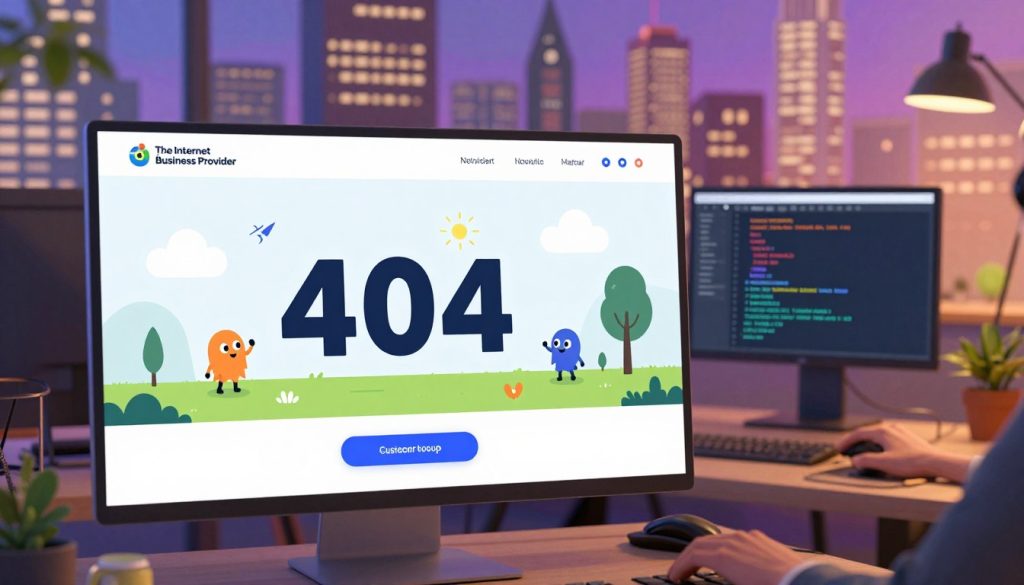
Turning a frustrating dead end into a helpful bridge is the goal of smart web design. Even with the most diligent maintenance, visitors may occasionally land on a missing page. This is why 404 error page optimization serves as a critical safety net for your digital presence.
Instead of letting a visitor bounce, you can use this moment to reinforce your brand identity. A well-crafted page keeps the user engaged and helps them find exactly what they need.
Designing a User-Friendly Error Page
Your error page should feel like a natural extension of your website. Avoid technical jargon that might confuse or alienate your audience. Instead, use a friendly and helpful tone to acknowledge the mistake while offering a clear path forward.
Keep the design clean and consistent with your overall aesthetic. A simple, empathetic message goes a long way in maintaining trust. When users feel supported, they are much more likely to continue exploring your content rather than leaving immediately.
Adding Search Bars and High-Value Service Links
The most effective 404 error page optimization strategy involves giving users immediate control. By placing a prominent search bar on the page, you allow visitors to find the content they were originally seeking. This simple addition can drastically reduce your bounce rate.
You should also include links to your high-value services or your homepage. Providing these shortcuts acts as a helpful guide, ensuring that your visitors remain within your ecosystem. Remember, a dead end is only a failure if you do not provide a way out.
Best Practices for Maintaining Link Health
A thriving website requires constant care to ensure every link remains functional and relevant. When you neglect your pages, you risk losing the trust of both your visitors and search engines. By adopting a proactive mindset, you can keep your digital presence strong and reliable over time.
Establishing a Routine Maintenance Schedule
The most effective way to stay ahead of errors is to perform a regular website audit. You should aim to scan your entire domain at least once a month to catch broken links before they pile up. This consistent check ensures that your navigation remains smooth and user-friendly.
During these audits, prioritize your high-traffic pages to ensure your most important content stays accessible. Consistency is the key to preventing small issues from turning into major technical headaches. Use the following table to organize your maintenance tasks effectively.
| Task Frequency | Action Item | Goal |
|---|---|---|
| Weekly | Check top 10 pages | Immediate UX fix |
| Monthly | Full site crawl | Identify broken links |
| Quarterly | Review external links | Verify partner status |
Preventing Future Link Rot During Content Updates
Link rot often happens when you update your site without considering the impact on existing connections. Every time you publish new content, integrate a link building strategy that accounts for old URLs. Always check if your new posts require updates to older, related articles to keep the internal structure intact.
When you remove or move content, make sure to set up proper redirects immediately. This simple habit prevents dead ends and keeps your site authority flowing correctly. Proactive management is far easier than cleaning up a broken site after months of neglect.
The Internet Business Provider Advantage for Digital Trust
Building a lasting brand online starts with the assurance that every visitor finds exactly what they need. When your site functions flawlessly, you create a seamless experience that encourages users to return. Professional oversight ensures that your digital presence remains a reliable asset rather than a source of frustration.
Why Professional Management Matters
Managing a website involves constant vigilance against technical decay. Without a dedicated strategy, sites often accumulate technical debt, which leads to broken links and outdated content. Professional management provides the expertise required to identify these issues before they impact your bottom line.
By choosing an experienced internet business provider, you gain access to proactive monitoring tools. These experts do not just fix errors; they optimize your site architecture to prevent future problems. This level of care allows your team to focus on growth while the technical foundation remains secure.
Building a Digital Trust Foundation
Trust is the currency of the modern web. When a user clicks a link, they expect to arrive at a relevant destination. If they encounter a dead end, their perception of your brand diminishes instantly. A solid foundation is built on consistency and reliability.
To maintain this standard, consider the following benefits of professional oversight:
- Consistent uptime through regular server and link monitoring.
- Improved user retention by eliminating frustrating navigation errors.
- Enhanced brand reputation as a dependable source of information.
- Strategic updates that keep your content fresh and functional.
Ultimately, investing in professional support transforms your website into a powerful tool for customer engagement. Every click becomes a step toward a stronger relationship with your audience. By prioritizing a Digital Trust Foundation, you ensure that your business remains competitive in an ever-changing digital landscape.
Advanced Technical SEO Fixes for Complex Sites
Complex web environments present unique hurdles that require advanced technical SEO fixes to keep search engine crawlers happy. As your site scales, the architecture often becomes tangled, leading to performance bottlenecks that are invisible to the average user. Addressing these structural issues is essential for maintaining a healthy, high-performing digital presence.
Handling Redirect Chains and Loops
Redirect chains occur when a URL points to a second URL, which then points to a third, creating a lengthy path for browsers and bots. These chains waste your crawl budget and significantly slow down page load times. You should aim to map every old URL directly to its final destination to ensure a seamless experience.
To resolve these issues, consider the following steps:
- Audit your site to identify multi-step redirect paths.
- Update internal links to point directly to the final, live URL.
- Remove unnecessary redirects that no longer serve a purpose.
By simplifying these paths, you provide a cleaner signal to search engines. This is a vital part of your technical seo fixes strategy, as it prevents crawlers from getting stuck in infinite loops.
Optimizing Canonical Tags to Prevent Crawl Errors
Canonical tags act as a guide for search engines, telling them which version of a page is the “master” copy. In large-scale environments, improper canonicalization often leads to duplicate content issues and wasted resources. When you fail to set these tags correctly, crawlers may index multiple versions of the same page, diluting your authority.
Effective technical seo fixes involve ensuring that every page has a self-referencing canonical tag. This simple practice helps prevent confusion when dynamic parameters or tracking codes are added to your URLs. Always verify that your canonical tags point to the preferred, indexable version of your content to maintain a strong search foundation.
Monitoring Your Site Authority and Bounce Rates
You have fixed the broken links, but how do you know if your efforts are actually paying off? The journey toward a healthy website does not end with the final repair. Instead, it shifts toward a phase of careful observation and data analysis.
By keeping a close eye on your performance metrics, you can confirm that your hard work is translating into real results. This process is essential for maintaining a competitive edge in the digital landscape.
Analyzing the Correlation Between Fixes and User Retention
When you remove dead ends, you provide a smoother path for your visitors. This improvement directly influences user retention, as people are far more likely to stay on a site that functions correctly. When visitors find what they need without hitting a 404 error, they tend to explore more pages.
This positive behavior signals to search engines that your site is reliable and high-quality. Consequently, you will often see a noticeable bounce rate reduction as users engage deeper with your content. A lower bounce rate is a strong indicator that your technical maintenance is successfully keeping your audience interested.
Using Analytics to Track Improvement Over Time
To see the full picture, you should use tools like Google Analytics to monitor your progress over several months. Look for trends in your traffic patterns that align with the dates of your site repairs. You want to see a steady climb in site authority as your pages become more accessible to crawlers.
Consistent monitoring allows you to spot new issues before they become major problems. By tracking these metrics, you can protect your search engine rankings and ensure long-term stability. The following table highlights the key metrics you should track to measure your success.
| Metric | Goal | Impact on Growth |
|---|---|---|
| Bounce Rate | Bounce rate reduction | Higher engagement |
| Average Session Duration | Increase | Improved user retention |
| Organic Search Traffic | Steady growth | Better site authority |
Conclusion
Your website serves as the primary face of your business in the modern digital landscape. Maintaining a healthy site requires a steady commitment that shapes how users perceive your brand and how search engines rank your content.
Regular audits and proactive link management turn a neglected site into a vibrant hub for your customers. By prioritizing these technical tasks, you protect your reputation and ensure that every visitor finds exactly what they need without frustration.
Take action today to secure your online authority. Implementing these strategies creates a reliable foundation that supports long-term growth and keeps your audience engaged. Your dedication to a seamless user experience will pay off through improved search visibility and stronger customer loyalty.
Start your next site scan now to identify any hidden issues. Reach out to your web development team or use trusted tools to keep your pages running smoothly. A polished, error-free website is the best investment you can make for your digital future.