
You invested thousands in a professional digital presence for impressing your customers. The UI is flawless, and the branding looks sharp. Yet, a hidden flaw often ruins this premium experience for every visitor.
The issue usually stems from low-quality server environments. Many providers pack 500 sites onto a single server for maximizing profits. This resource overselling means your site constantly competes for tiny bits of processing power.
This creates a massive bottleneck for your business growth. It turns a digital masterpiece into a source of frustration for potential leads.
Poor server performance makes your stunning design feel like a rusty bicycle. Even the best code cannot overcome 10x resource overselling. You need a setup that matches your high-end digital presence.
Migrating to faster website hosting is the key for reclaiming site speed. This guide simplifies the transition so your digital home stays fast. Upgrading your infrastructure protects your business investment and ensures the financial returns you deserve.
Key Takeaways
- Shared servers often house hundreds of sites, causing slow load times for users.
- High-quality web design requires robust infrastructure for long-term success.
- Poor performance can waste the capital spent on professional UI/UX development.
- Moving toward a better server protects your platform from unexpected traffic spikes.
- A clear roadmap prevents data loss during the technical transition process.
- Upgrading server power ensures you receive the expected returns on your investment.
Why Your Beautiful Website Is Being Sabotaged by Slow Hosting
Imagine investing in a luxury storefront only to keep the front door locked while customers wait outside. A stunning website cannot fulfill its purpose if the server fails to deliver it quickly to your visitors. Your choice of hosting determines whether a person stays or leaves before they see your brand.
Modern developers use heavy graphics and complex frameworks to build visual masterpieces. However, these elements require significant power to load correctly. If your infrastructure lags, you are effectively hiding your business behind a digital wall of frustration.
The Investment You’ve Already Made in Design
Professional design is a major financial commitment for any growing business. Owners typically spend between $5,000 and $50,000 on custom layouts, graphics, and user interface optimization. This site investment aims to build trust and drive sales through visual excellence.
Using inadequate hosting effectively nullifies this entire financial spend. When a server takes too long to respond, it creates friction during the most critical moment. You only get one chance to make a first experience count for a potential client.
Every dollar spent on responsive layouts is wasted if the initial impression is a blank screen. High-end visuals mean nothing if the underlying technology cannot handle the weight of the files.
What Slow Hosting Actually Does to Visitor Experience
Research shows that a typical user expects a page to load in under two seconds. If your performance is sluggish, visitors often encounter broken layouts or images that fail to render. Most people will hit the back button before your logo even appears.
A delay of just three or four seconds creates a deep psychological impact. It makes your company appear unprofessional, outdated, or simply not worth the wait. This perception sticks with the visitor even if your website eventually loads.
Poor hosting ruins your brand reputation and reduces consumer trust. It ensures that your high-end site never gets the chance to convert visitors into loyal customers. Choosing the right server is just as important as the design itself.
| Load Time | User Reaction | Business Impact |
|---|---|---|
| Under 2 Seconds | High Engagement | Optimal Conversions |
| 3-4 Seconds | Rising Frustration | 40% Abandonment |
| 5+ Seconds | Immediate Exit | Severe Brand Damage |
The “Beautiful Design vs. Poor Performance” Paradox
The disconnect between high-end web design and low-end hosting creates a frustrating paradox for modern businesses. You might spend thousands on a sleek user interface, yet visitors only see a blank loading screen for five seconds. A stunning visual site loses all its value if the underlying technology cannot deliver it quickly to the user.

Many owners believe that a pretty layout is enough to win customers. However, high-resolution graphics and complex animations require a powerful engine to run smoothly. Without that power, your aesthetic investment stays hidden behind a wall of lag.
Why Modern Frameworks Demand Modern Infrastructure
Modern web frameworks like Next.js, Laravel, and React create sophisticated, dynamic user experiences for your visitors. These tools perform heavy tasks like server-side rendering and complex database queries to function. They demand significant RAM and CPU cycles that basic shared hosting simply cannot provide.
Basic hosting environments often fail to support these advanced scripts efficiently. When the infrastructure is weak, your dynamic features will stutter or fail to load entirely. You need a dedicated environment that respects the technical requirements of these modern coding standards.
When Optimization Can’t Fix Infrastructure Problems
Website owners often fall into an optimization trap by focusing only on small code changes. They spend weeks compressing images, minifying CSS, and installing various caching plugins to save milliseconds. These efforts are helpful but cannot replace the raw power of a high-quality server.
If your hosting provider limits your resources, code-level optimization will eventually hit a hard ceiling. No amount of script cleaning can fix a CPU that is shared with hundreds of other busy websites. You must address the hardware limitations before you can see real speed improvements on your site.
The Server Bottleneck That Kills User Experience
A server bottleneck occurs when the hosting environment throttles your usage or restricts I/O operations. This artificial constraint acts like a narrow pipe trying to move a massive amount of water. Even the most efficient code will slow down when the infrastructure refuses to allocate more memory.
Users expect a response in under two seconds, regardless of how “heavy” your design might be. Recognizing this bottleneck is the first step toward a successful migration. Moving to a faster host ensures your design ambitions finally match your technical reality.
| Feature | Budget Shared Hosting | High-Performance Hosting |
|---|---|---|
| CPU Allocation | Throttled and Shared | Dedicated Resources |
| Loading Speed | 4-6 Seconds | Under 1.5 Seconds |
| Framework Support | Limited/Slow | Fully Optimized |
| User Retention | Low (High Bounce) | High (Engaged) |
The Hidden Costs of Cheap/Slow Hosting
Choosing budget web services is often a false economy that bleeds money through missed opportunities and invisible penalties. The $5 you save each month on low-tier hosting likely costs your business thousands in lost leads.
Many owners view these savings as a win for the budget. However, slow server responses act as a silent drain on your growth and digital reach.
These expenses are not just theoretical; they show up in your analytics every single day. Poor infrastructure creates a glass ceiling that prevents your brand from ever reaching its full potential.
SEO Penalties: How Google’s Core Web Vitals Punish Slow Sites
Google made Core Web Vitals a significant ranking factor in 2021 to ensure better user experiences. Metrics like Largest Contentful Paint (LCP) must occur within 2.5 seconds to maintain a “good” status in search results.
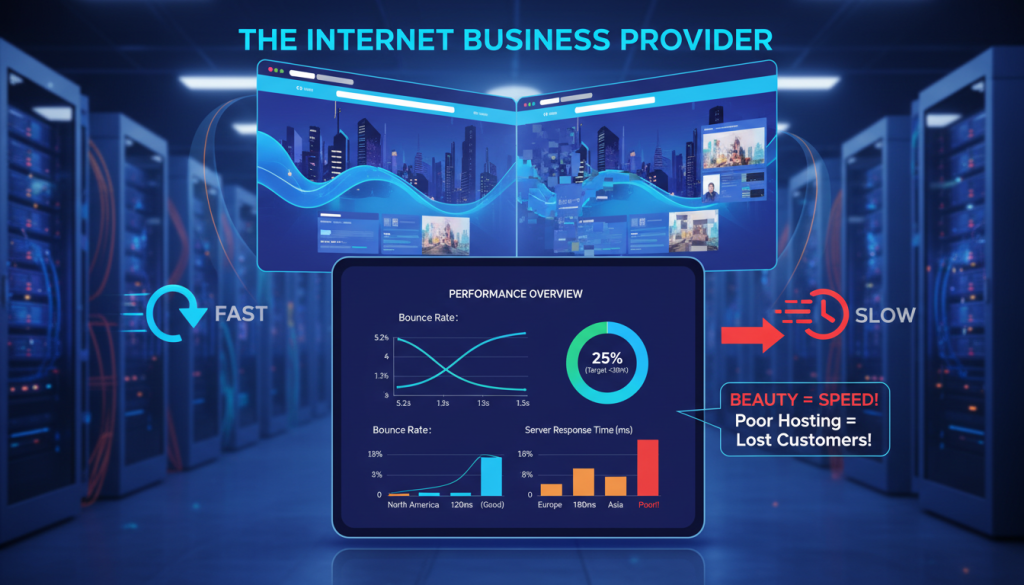
Low-quality servers often struggle with Interaction to Next Paint (INP) and Cumulative Layout Shift (CLS). When your hosting cannot keep up with these technical demands, your site visibility drops significantly.
A slow speed score tells search engines that your page is not worthy of the first page. This leads to a steady decline in organic traffic as faster competitors take your spot.
Bounce Rates: Users Abandon Sites That Don’t Load Within 2 Seconds
Modern users have very little patience for a sluggish interface. Research shows that 53% of mobile visitors will leave if a page takes more than three seconds to load.
Every extra second of delay causes your abandonment rate to climb exponentially. This means cheap hosting actively pushes your potential customers into the arms of your rivals.
You may have the most beautiful design in the world, but it matters little if no one waits to see it. High bounce rates also signal to search engines that your content is not relevant, further damaging your rank.
Lost Revenue: The Direct Correlation Between Speed and Conversions
There is a direct link between server speed and the revenue your business generates online. Real-world data indicates that conversions can jump by 60% when load times drop from 3.2 to 1.4 seconds.
One professional services client saw this impact firsthand after moving from a $12 shared plan to a $45 VPS. Their 1.4-second load time boosted their conversion rate to 2.9%, creating $18,000 in extra annual revenue.
The extra $396 spent on quality hosting was a tiny investment compared to the massive financial gain. Fast performance prevents dropped shopping carts and ensures your site captures every possible lead from your incoming traffic.
| Metric | Budget Shared Hosting | Premium VPS Hosting | Business Impact |
|---|---|---|---|
| Average Load Time | 3.2 Seconds | 1.4 Seconds | Improved User Retention |
| Conversion Rate | 1.8% | 2.9% | 61% Growth in Sales |
| Annual Hosting Cost | $144 | $540 | $396 Difference |
| Est. Annual Revenue | $30,000 | $48,000 | $18,000 Net Gain |
Clear Signs It’s Time to Upgrade Your Hosting Infrastructure
Recognizing that your hosting has become a liability rather than an asset requires a keen eye for specific performance metrics. Identifying these warning signs early allows you to plan a proactive migration. You should move before a minor glitch turns into a major business crisis.
Many owners wait until their website goes dark to realize their current infrastructure is inadequate. However, subtle patterns in your daily operations often reveal the truth much sooner. These indicators show that your provider can no longer support your growing digital presence.
Frequent Downtime and Unexplained Outages
Experiencing downtime more than once per quarter is a major red flag for any professional business. If your provider cannot explain why your pages disappear for minutes or hours, they are likely overselling their capacity. This pattern suggests you have outgrown the shared resources provided by your current hosting plan.
Slow TTFB (Time to First Byte) Consistently Above 600ms
Time to First Byte measures how quickly your server responds to a visitor’s request. When testing tools show a TTFB consistently above 600ms, your performance is suffering at the hardware level. This delay happens before your website code even begins to load on the user’s screen.

Optimization tricks cannot fix a sluggish backend response. If your TTFB remains high despite caching and image compression, the hardware itself is the bottleneck. You need a more robust environment to handle the initial handshake between the user and the data.
Site Crashes During Traffic Spikes
Your site should thrive during a successful marketing campaign or a social media mention. If it crashes exactly when new visitors arrive, your environment cannot scale to meet legitimate business needs. A failure during high traffic periods means you are literally losing money and potential customers.
Predictable growth should not lead to system failure. Hosting that buckles under pressure indicates that your business has evolved beyond the entry-level tier. It is time to seek a solution that offers elastic resources for your expanding audience.
Resource Limit Warnings and CPU Throttling Notifications
Receiving frequent alerts about hitting memory thresholds or CPU limits is a definitive signal for a move. Providers use these issues to tell you they are artificially constraining your account to protect other customers. This throttling proves that you are paying for space that is too small for your actual workload.
Repeated issues with resource allocation signify that you are being penalized for your success. Instead of struggling with limits, find a partner that encourages your expansion. Proactive migration ensures your traffic always has a smooth path to your content.
| Indicator | Threshold for Concern | Primary Cause |
|---|---|---|
| Downtime Frequency | More than once per quarter | Oversold server capacity |
| TTFB Speed | Consistently over 600ms | Poor hosting configuration |
| Traffic Response | Crashes during peak hours | Lack of scalable resources |
| Resource Alerts | Weekly CPU/RAM warnings | Throttled site environment |
Choosing Your New Hosting Provider: What Actually Matters

Selecting a high-performance web host depends on understanding your specific technical requirements rather than just looking for the lowest cost. High-quality providers offer the stability and infrastructure your brand needs to thrive in a competitive market.
The best high-performance web hosting providers focus on long-term scalability. You should create a shortlist of three potential candidates and test them sequentially during their money-back periods to see which one handles your traffic best.
Matching Your Website’s Needs to the Right Hosting Type
Shared hosting ($3–15/month) suits small, low-traffic sites that only need basic resources. Growing businesses often require a VPS plan ($20–60/month) to gain dedicated CPU and RAM for better stability.
Managed WordPress web hosting ($25–100/month) provides specialized optimization and expert maintenance for specific platforms. For mission-critical applications or high-volume stores, dedicated servers ($80–300+/month) offer the ultimate power and control.
Performance Metrics: Speed, Uptime, and LCP Scores
Look for providers that guarantee uptime above 99.9% to ensure your site stays visible at all times. A top-tier provider should deliver a Time to First Byte (TTFB) consistently under 400ms to keep browsers engaged.
Aim for Largest Contentful Paint (LCP) scores below 1.8 seconds on test sites to maintain peak performance. Validate these metrics personally by using trial accounts to test your site speed and responsiveness before you sign a long-term contract.
Security Features and Customer Support Quality
Your chosen plan must prioritize security with free SSL certificates, DDoS protection, and automated backups. Quality web hosting depends on 24/7 technical support that offers deep expertise rather than scripted answers.
Transparent pricing and clear cancellation policies show that a company values its customers and practices ethical business. Always choose a hosting partner that provides robust security and proactive support to protect your digital investment.
Pre-Migration Preparation: Setting Yourself Up for Success
Preparing for a transition determines whether your website move is a seamless experience or a technical nightmare. Proper preparation eliminates most common migration problems and reduces stress throughout the entire journey. By taking the right precautions now, you protect your hard work from unexpected errors or downtime.
Most migration failures occur because of rushed actions or a lack of redundancy. Thorough planning serves as your safety net. It allows you to move forward with total confidence in your technical choices.
Testing Your New Host’s Speed Before Committing
Before you fully commit to new hosting, you must validate that the infrastructure actually performs better. You can clone your website to the new environment using a temporary test domain or a provider’s staging URL. This testing phase allows you to run speed audits from multiple geographic locations without affecting your live audience.
Compare the results against your current provider to ensure the upgrade is worth the effort. Look for improvements in Time to First Byte (TTFB) and Largest Contentful Paint (LCP). If the performance doesn’t meet your standards now, it likely won’t improve after the setup is finalized.
Creating Complete Backups of Your Website Files
A comprehensive backup is your most important insurance policy during this process. Use your current hosting cPanel File Manager or an FTP client like FileZilla to download all files to your local computer. This includes your root directory, themes, plugins, and every piece of uploaded media.
Do not rely on a single copy of your site. Store these files in multiple locations, such as a local hard drive and a secure cloud service like Google Drive. Having redundancy ensures that you can recover your work even if one storage method fails.
Exporting Your Database Without Data Loss
Your database contains all your posts, user comments, and critical site settings. To export this data safely, access phpMyAdmin through your current control panel and select your specific database. Use the “Export” tab and choose the “Quick” method to generate a .sql file for download.
Always verify the export by checking that the final file size looks correct compared to your previous backup attempts. This file is the heart of your digital presence. Without a clean export, your website will lose its functionality and content history.
Documenting Your Current Site Configuration and Settings
Documenting your current configuration ensures you can replicate your environment perfectly on the new hosting. Create a detailed checklist that includes your current PHP version and all active plugin settings. This step helps prevent software conflicts that often arise when moving between different server environments.
You should also record your email account rules, SSL certificate details, and custom .htaccess modifications. Having this data written down eliminates the fear of loss. It allows you to troubleshoot any post-migration issues with a clear reference point.
| Preparation Task | Primary Tool | Critical Outcome |
|---|---|---|
| File Preservation | FTP / FileZilla | Redundant copy of code and media |
| Database Export | phpMyAdmin | Protection of content and users |
| Environment Sync | Server Dashboard | Matching PHP and SSL settings |
| Performance Check | Staging URL | Validation of server speed |
Migrating to Faster Website Hosting: The Step-by-Step Process
Transitioning to a high-speed server involves a systematic sequence that transforms your preparation into actual performance gains. This detailed roadmap serves as your guide to a successful migration without unnecessary technical stress. By following every step carefully, you ensure your website remains stable and secure throughout the transition.
The entire migrate website journey requires patience and attention to detail. This process eliminates the risk of losing valuable information while moving to a better environment. Think of this as a professional relocation for your digital assets where organization is the key to success.
Step 1: Set Up Your New Hosting Account and Environment
First, sign into your new hosting provider and select the plan that best fits your traffic needs. Complete the account creation process by providing your payment details and setting up your primary login. This step establishes the destination environment where your site will live.
Access your new control panel, which is typically cPanel, to familiarize yourself with the interface. Ensure you have your login credentials ready for the next phase of the migration. Taking a few minutes to explore the dashboard now will save you time later.
Step 2: Transfer Website Files Using FTP or File Manager
Connect to your current hosting using FTP credentials via a client like FileZilla. You should download all website files directly to your local computer to ensure you have a fresh copy. This step usually takes between 15 and 60 minutes depending on the total size of your content.
Once the download finishes, connect to your new account using the new FTP details. Upload these files to the public_html folder or the designated root directory on the new account. This part of the migration ensures that all your images, themes, and plugins are moved correctly.
Step 3: Create and Import Your Database on the New Server
Access the MySQL Database Wizard in your new cPanel to create a fresh database for the migration. Assign a secure username and a complex password to protect your site data. Write these details down immediately, as you will need them to link your website content soon.
Open phpMyAdmin on the new account and select the database you just created. Use the Import function to upload your previously exported .sql file to complete this step. Verify the data transfer by checking that the table counts match your old setup exactly.
Step 4: Update Configuration Files and Database Connections
Locate your primary configuration file, such as wp-config.php for WordPress, and open it for editing. Update the connection strings to reflect your new database name, username, and password. This critical step allows your code to communicate with the new database on the migration destination.
| Setting Type | Old Value | New Value |
|---|---|---|
| DB_NAME | Old_DB_01 | New_DB_Premium |
| DB_USER | Admin_Old | Admin_Secure_New |
| DB_HOST | localhost | localhost (usually) |
Verify that your file permissions are set correctly to maintain high security. Use 644 for individual files and 755 for directories to keep the migration secure. These settings prevent unauthorized access while allowing your website to function properly.
Step 5: Test Your Site Thoroughly Before DNS Changes
Before you migrate website traffic officially, you must test the environment using a temporary URL. Systematically check your navigation menus, contact forms, and search features to ensure everything works. This step identifies any broken links or missing images before your visitors ever see them.
Create a comprehensive testing checklist to verify user registrations and shopping cart functions if applicable. Thorough testing is the best way to prevent downtime during the final stage of the migration. Never rush this step, as discovering errors after going live can hurt your brand reputation.
Following these steps systematically ensures a successful transition while minimizing the risk of errors or potential data loss.
Remember that each step builds on the previous one to ensure a smooth migration. Rushing through the testing phase creates a high risk of discovering problems only after you have redirected live traffic. Invest the necessary time now to ensure your hosting upgrade is a complete success.
Switching Your DNS and Going Live
The moment of truth arrives when you point your domain toward your new hosting to go live. This critical step makes your migration visible to the world. It is the bridge between your old hosting and your improved infrastructure.
Transitioning to a faster site requires patience during this final phase. This migration process acts as a digital map for your visitors. By updating these records, you ensure everyone finds your high-quality content on the better server.
Understanding DNS Propagation and Timing
Propagation is the time it takes for update information to spread across the internet. This process typically completes within 24 to 48 hours. However, many users will see the website on the faster server much sooner.
During this time, some visitors might still land on the old hosting. This happens because various internet service providers refresh their records at different speeds. Geographic location plays a large role in how quickly the domain updates for a specific user.
Updating Your Domain’s Nameservers
Log into your domain registrar account, such as GoDaddy or Namecheap. Navigate to the management section to find your current nameserver fields. Replace those old values with the ones provided by your new hosting provider.
Check your welcome email to find the specific addresses required for this change. Once you save these changes, the migration move officially starts across the web. Modern systems usually begin the domain update process almost instantly.
| Launch Phase | User Experience | Technical Goal |
|---|---|---|
| Record Update | Old site remains visible | Link server to name |
| Propagation | Mixed loading results | Spread global data |
| Final Launch | Fast site is visible | Confirm speed gains |
Monitoring Performance Immediately After Migration
Immediately after the domain shift, you should monitor your website closely. Use tools like PageSpeed Insights to verify that the new hosting is delivering faster load speeds. This confirms your investment in better hardware was successful.
Check your contact forms and checkout processes to ensure everything works perfectly. You must also verify that email delivery continues without issues. A smooth migration means your visitors should never notice the technical transition, only the improved speed.
When It’s Safe to Cancel Your Old Hosting Account
Do not cancel your old hosting plan immediately after making changes. Maintain that account for at least 72 hours to prevent any potential downtime. This window allows every server worldwide to catch up with your domain update.
Wait until you are certain that all traffic is hitting the new hosting environment. Check your analytics to confirm the data sources are consistent. Only after a successful migration audit should you finalize the cancellation of the previous service.
- Verify nameserver propagation from at least five global locations.
- Test all website links and forms on the fresh server.
- Ensure SSL certificates are active and valid for the domain.
- Confirm that no downtime occurred during the record swap.
“The final 72 hours of a transition are the most critical for maintaining visitor trust.”
Overcoming Migration Fear: Addressing Downtime and Data Loss Concerns
The anxiety of a complex website migration often keeps sites trapped on slow, outdated servers. While the fear of suffering long downtime is real, these risks vanish with a structured process. Proper preparation turns a daunting technical hurdle into a routine upgrade for your business.
The Truth About Migration Downtime
When you use a parallel setup, your website migration causes zero downtime. You build the site on the new hosting environment while the old server remains live. Visitors only see a brief flicker during DNS propagation, ensuring your business stays open throughout the migration.
How to Prevent Lost Data and Broken Links
Redundancy is your best friend when protecting your website. By keeping local backups and copies on both servers, data loss becomes nearly impossible. You should verify every file and database table after the hosting transfer is complete.
Testing on temporary URLs ensures no broken links haunt your new setup. A systematic check of your internal links and media files confirms that your site remains fully functional. This extra step guarantees that your visitors enjoy a seamless experience from the moment you go live.
SEO Impact During Hosting Transitions
Many owners worry about SEO, but Google does not punish you for switching to a better hosting server. A faster hosting provider actually improves your rankings over time. Negative SEO impact only happens if you leave the website broken or offline for several days.
When Managed Migration Services Make Sense
If technical steps feel overwhelming, professional website migration services are a smart investment. For a small fee, typically between $100 and $300, experts handle the technical migration. These services provide peace of mind for business owners who want a hands-off approach to migration.
Moving to a new server is a calculated business decision. With the right website, the migration becomes a simple transition rather than a risk. You can avoid downtime and protect your data by following a proven migration path.
Expert migration support ensures your downtime remains non-existent. Completing a website migration is the final step toward a faster, more reliable digital presence. Trusting the migration strategy allows you to focus on growth while the experts ensure a smooth migration.
Conclusion
The choice to pursue migrating to faster website hosting is a critical business decision that protects your design investment. A slow website does more than frustrate users; it triggers SEO penalties and ruins conversion rates. These hidden costs often outweigh the price of premium hosting services.
While a migration requires precision, it is a systematic process that brands master with proper preparation. Improving your performance by 40-60% creates a seamless experience that matches your beautiful design. Reliable hosting ensures the site stays online and supports long-term growth.
Do not let an inadequate server hold your website back from its full potential. Start your migration today to reclaim lost revenue and improve search rankings. This final migration step is the key to achieving the online success your brand deserves. A successful migration provides total peace of mind for your future.