

If your social account disappeared or your web provider closed tomorrow, what could your business still access? A visible profile is not the same as control of the domain, website files, customer records, or login details behind it. Digital asset ownership for small businesses starts with knowing what you can reach, change, and transfer. It also means spotting which tools rely on a platform or another provider.
This is a planning issue, not just a tech concern. A September 2014 article in the Journal of Financial Planning discussed digital continuity as part of succession planning. It reported that about 99 percent of U.S. employers had fewer than 500 employees. The article also cited 2008 Census data: small firms employed more than 120 million people and generated $989 billion in annual revenue. Those figures show why a lost login or blocked transfer can affect livelihoods.
This guide covers domains, website content, account access, data, security, and provider changes. Rented services are not all unsafe, but owners need clear records and a plan to move essential assets. Control takes ongoing care, too: review access, update recovery details, and check who can act if one person is unavailable.
Key Takeaways
- An online presence does not always mean you control the accounts behind it.
- Know who can access your domain, site, records, and key profiles.
- Keep recovery details and transfer steps current.
- Review security and provider terms as your needs change.
- Plan for continuity if an account or key contact becomes unavailable.
Digital asset ownership for small businesses: What it means
In this guide, the term covers valuable information and materials kept in electronic form. Examples include a domain, website files, brand materials, accounts, customer databases, and published content. These items help a company communicate, serve customers, and keep daily work moving.
What belongs in the collection?
The Journal of Financial Planning distinguishes stored content from the computer, phone, or hard drive that holds it. A device is not the information saved on it. The range can be broad:
- Email, websites, software, and customer records
- Payroll and ordering systems, online banking, and accounting documents
- Photographs, brand media, and other files used in marketing
How these materials support daily work
Teams rely on these materials to manage orders, share information, promote products, and handle finances. Clear digital asset management helps owners find the right files and keep key tasks on track. Bank of America’s 2012 Small Business Owner Report found that about 42 percent of owners viewed social media marketing as effective. That finding shows how online activity can support visibility and customer outreach.
Which digital assets does your business depend on?
Start with a working inventory, not just the public-facing website. List each domain, site file, customer database, brand item, email account, social profile, and operational login your team relies on. The Journal of Financial Planning also names payroll, ordering, online banking, accounting records, photos, consumer details, and software. These less visible tools can keep daily work moving.
- Note where each item lives, who uses it, and what task it supports.
- Check whether you can export or transfer its data and files.
- Flag records tied to a personal account or managed by only one person.
A 2013 NSBA survey found that 87% of small businesses used desktop computers, 84% used laptops, 74% used smartphones, and 41% used tablets. With information spread across devices and providers, a clear inventory helps business owners spot gaps. Digital asset management, including DAM systems, can help organize content, but it does not replace a record of accounts and access needs.
Business-controlled assets versus platform-dependent visibility
A polished website can make a company look established while key controls sit with a vendor, contractor, or individual user. Customers may see the site or social media profile, yet the company may not control its domain, files, or administrator account.
Third-party services can store digital assets behind personal, password-protected accounts. The Journal of Financial Planning notes that provider agreements may affect access, rights, and transfer options. It cited a historical Yahoo! agreement that described user content as non-transferable and subject to deletion after a user’s death. Terms change, so business owners should read the current agreement rather than assume content can move.
Know What You Can Control, Access, and Transfer
Use this quick control test for each key account:
- Who holds the account and can change its settings?
- Who can recover access if a staff member leaves?
- Can the company export files and move them to another provider?
A right to use a platform does not always mean a practical way to move a domain, content, or login details. Control depends on clear account records and tested transfer steps. A small business can use asset management planning to separate platform visibility from tools it can manage and move. Review the terms, then confirm who can act if an owner is unavailable.
Understand the risks without assuming every rented service is unsafe
Third-party services can offer useful tools, reliable hosting, and expert support. The risk comes when a company cannot reach its accounts, move its files, or recover key information. A service agreement and a tested recovery plan can help limit surprises.
The NSBA’s 2013 technology survey found that about 40 percent of small business owners managed their own IT. Another 32 percent relied on one employee. That concentration can leave small businesses exposed when a key person is away or leaves.
A Journal of Financial Planning example describes Mr. Smith’s custom glass company, with five employees, about $5 million in annual business, and roughly $500,000 in net profit. He handled payroll, orders, accounting, delivery, and banking. If he lost account access, daily work could stall.
Spot weak points and plan recovery
Suspension, misplaced credentials, provider lock-in, or limited exports can interrupt work. These risks do not make every rented service unsafe. Phishing, stolen passwords, software flaws, outages, human error, and mishandled backups can also threaten digital assets.
Check security safeguards and recovery options before problems arise. Confirm who can reach key systems, whether data can be exported, and how backups can be restored. A DAM system may help organize files, but owners still need clear responsibility and a recovery plan.
Domain registration requires renewal and ongoing security
A domain is a key business asset, but registration does not last forever. Track its renewal date and make one person responsible for payment. Missed renewals can disrupt email or take a website offline, even when the company created the site.
Registration alone does not secure a domain. Weak passwords, unauthorized account changes, or outdated recovery details can put access at risk. Keep the registrar account under business control. Confirm that authorized staff can update contacts, settings, and recovery details.
“A domain is useful only when the right people can reach and manage it.”
The Journal of Financial Planning stresses knowing an asset’s ownership, location, accessibility, and transfer options. Apply that guidance to digital assets: record where the registrar account sits, who can access it, and how a transfer works. Password-protected provider accounts can create practical hurdles when only one person has the login.
During routine planning, review registrar access and renewal steps. Check that payment details and recovery contacts still work. These simple management habits help a small business avoid a preventable interruption if staff or providers change.
- Confirm the renewal date and payment responsibility.
- Review access with business owners and other authorized owners.
- Keep a record of transfer steps and account recovery details.
Clarify content rights, account access, and data responsibilities
A file may look ready to use, yet its license can limit where it appears or who may share it. Clear records help business owners protect creative work and handle customer details with care.

Record rights to files and brand materials
Note who created or licensed each website file, photo, logo, and other media. Save contracts, receipts, and usage limits with related documents. Service agreements may also restrict whether digital assets can transfer or pass to another person, as the Journal of Financial Planning explains. Check terms before relying on a service to move content.
Limit access to customer data
List the information your business collects, why it needs each item, and which people need access to do their assigned role. Keep sensitive data out of shared folders when possible. Grant only the permissions each person needs, then review them when duties change.
A DAM system can apply permissions to files, keeping private content visible only to approved users. This simple management step supports security and helps a small business maintain control as its team and services change.
Build a digital asset management plan that fits your business
A clear plan helps your team find key files and keep daily work moving. It can also show where records live, who handles them, and whether your company can move them to another service.
Inventory resources, name leads, and check export options
Record each item’s purpose, location, responsible person, usage rights, access needs, and recovery or export steps. Start with a spreadsheet or existing software; a small business may not need a costly platform. Choose tools that suit your files and workflow.
Laura Grant of BlueSky Solutions points to useful features such as secure storage, sharing, cataloging, search, tags, and version history. Alex Li of StudyX notes that DAM can support teamwork, brand consistency, and fewer content mistakes. Some systems also connect with Adobe Creative Cloud to speed creative work.
Market figures offer context, not a reason to buy. One source values the global DAM market at about $6.6 billion in 2024. Another cites a forecast of 11.78% yearly growth through 2035, reaching about $21 billion.
| Planning step | What to record | Why it helps |
|---|---|---|
| List key resources | Purpose, location, and rights | Clarifies what the team uses |
| Name a lead | Responsible person and access needs | Keeps duties clear |
| Check portability | Export and recovery steps | Supports a smoother provider change |
Digital asset ownership checklist for small business owners
A brief review can reveal gaps in control, recovery, and recordkeeping. Use this checklist during routine planning, then update it when staff roles or service providers change.
Confirm business-controlled registrar and administrator accounts
Check that the company controls key accounts and that authorized owners can reach them. The NSBA’s 2013 survey found that about 40 percent of owners handled their own IT, while 32 percent relied on one employee. In a Journal of Financial Planning example, Mr. Smith alone knew how to reach his company’s online services. Digital asset management should reduce that kind of dependency.
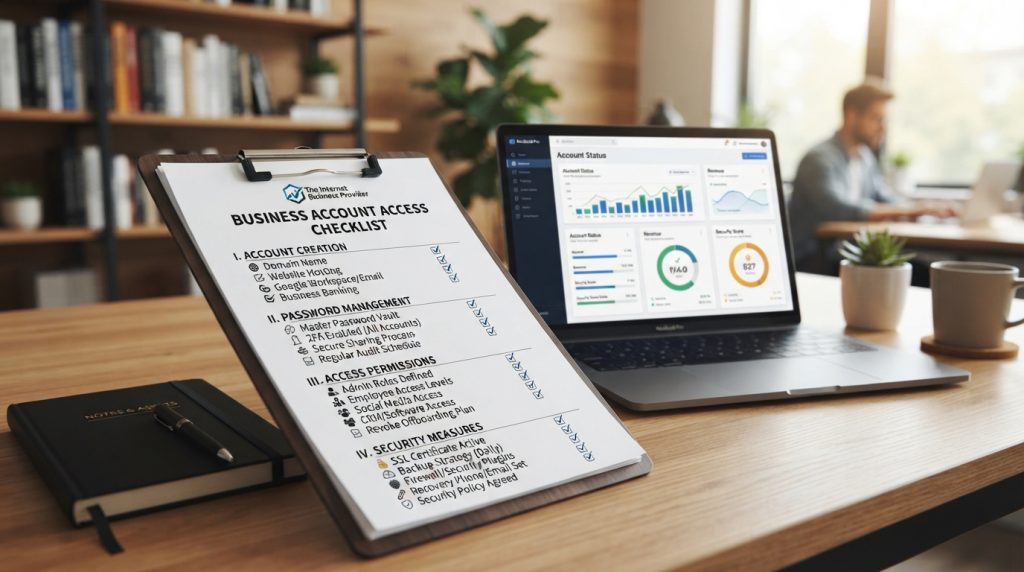
Secure recovery access, enable multifactor authentication, and test backups
- Record rights to website files, images, and brand materials.
- Check whether providers let you export usable copies.
- Protect recovery details and name a responsible person.
- Enable multifactor authentication on key accounts.
- Restore backup files to confirm they work.
- Limit permissions to approved people; review them when roles change.
Test the process, not just the settings. Confirm that your team can recover access and restore needed information.
| Review area | Check | Next step |
|---|---|---|
| Accounts | Company control and recovery access | Verify authorized access |
| Content | Rights and export options | Save records and usable copies |
| Protection | Authentication and backups | Test recovery and restoration |
Switch web providers while keeping your domain, content, and access
Moving a website to a new host does not require giving up your domain or starting over. A clear migration plan can protect customer service and support business continuity while providers change.
Plan the move to keep site files and services intact
Before switching, confirm administrator access and record the current site structure. Check whether the outgoing provider can export website files, databases, and other key information. Keep the registrar account under company control, so the domain stays with the business during the transfer.
DAM tools can help staff review metadata, permissions, and version history. These details identify approved content and reduce confusion during a move. If both providers support network connections or APIs, they may transfer files between systems with less manual work. Confirm the method before relying on it.
Coordinate timing with both partners. Test pages, forms, and checkout on the new site before launch. Make sure business owners can reach administrator and recovery accounts. Keep verified backups and a rollback plan ready. If a test fails, restore the prior site while the team fixes the issue. This can prevent needless downtime for customers and staff.
How IBP helps business owners plan for digital continuity
Domains, website files, and account details may sit with different providers. IBP offers a transparent conversation to help a small business identify useful questions and plan next steps. A third-party service can be a sound choice when owners understand its terms and recovery options.
Discuss your setup with a transparent partner at theinternetbusinessprovider
Review who controls key accounts, where company content lives, and how staff can export or recover it if a provider changes. The Journal of Financial Planning highlights four points to consider: rights, location, accessibility, and transfer options. This is general planning guidance, not legal advice.
- Name a responsible person for each major account group.
- Review access and test backup recovery.
- Record how teams can move files and key information.
IBP can help owners organize questions about domains, site content, account access, and security. Digital asset management tools, including DAM systems, may help teams organize content, but they do not replace clear responsibilities. The goal is practical continuity, not fear of every platform.
“Good continuity planning starts with knowing who can act, what is stored, and how to recover it.”
Talk through your setup with theinternetbusinessprovider. A clear discussion can help your small business decide what records, access, and recovery steps fit its needs.
Conclusion
Reliable continuity begins with knowing which digital assets your team uses, who controls each account, and whether files can move. A practical digital asset plan links that knowledge to clear roles and regular planning.
Keep domain registration current; a missed renewal can interrupt your site or email. Control alone is not enough. Secure logins and tested recovery steps matter just as much.
Use this final review:
- Record content rights and check export options.
- Protect recovery details, enable multifactor authentication, and test backups.
- Limit customer information and sensitive account access to authorized staff.
Choose DAM or other software only when it fits your workflow; tools cannot replace clear responsibility. Business owners can discuss their setup with IBP at theinternetbusinessprovider and plan continuity before a provider change or access problem.
